


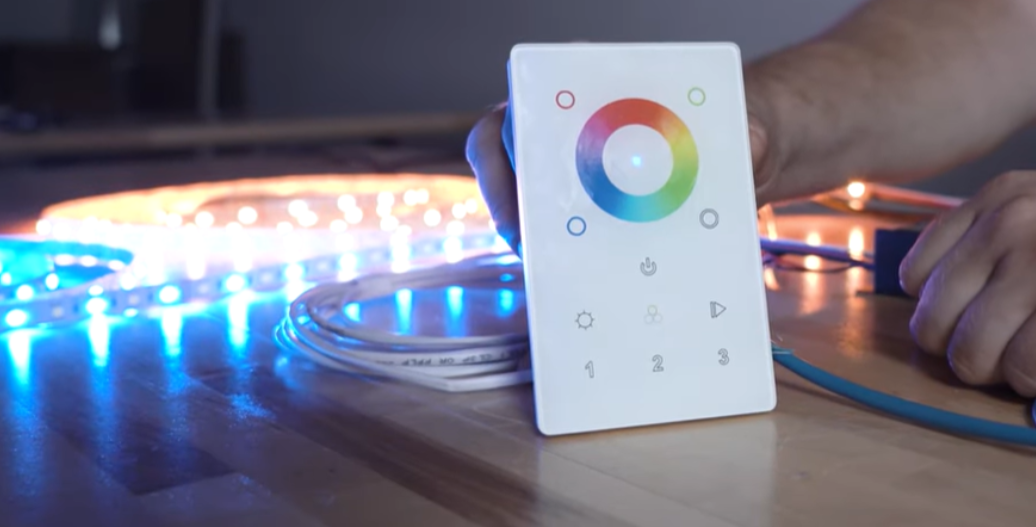

Addressable strip lights show up in everything from restaurant feature walls to high-end kitchen remodels. The question isn't whether to use them, it's which control protocol fits the job. SPI and DMX handle signaling differently, and that affects wiring complexity, troubleshooting, and what happens when something fails after you've left the site. Here's the breakdown.
In this article, we’ll dig into the different ways to control addressable strips, cover the most common control methods, and share a quick glossary of key terms you’ll encounter as you dive into the world of addressable lighting.
Terms
Strip Light - For the purposes of this article, a strip light (also known as a tape light) is an array of LEDs divided into sections on a flexible circuit board. Most strips are about 16.4 feet long, though some can be much longer.
Strip Light Section - A group of LEDs on the strip light that are controlled together.
LEDs - It’s important to distinguish between individual LEDs and sections. LEDs (Light Emitting Diodes) are the individual components/dots that produce visible light. On most strip lights, one section of the strip has six LEDs.
Direction - Unlike strip lights, addressable strip lights have a defined direction. This indicates the path along which the addresses increase. It’s usually marked by a small arrow printed on the flexible circuit board (the strip itself).
Signal and Power - Signal tells the strip light what to do, such as color or dimming. On a regular strip light, the signal is combined with the power, and you control the light simply by adjusting the power. On an addressable strip the signal is separate and has its own lead wires, allowing individual control of each section.
Protocol - A protocol is the method of signaling used by the addressable strip light. The two most common protocols used in aspectLED products are SPI addressable strip and DMX addressable strip.
Refresh Rate - The speed at which the controller updates the LEDs with new information. A higher refresh rate results in smoother animations and color transitions.
SPI (Serial Peripheral Interface) - One of the most common methods used to control addressable strips. Within SPI, there are many chipset types. It’s important to ensure that your SPI Addressable Controller is compatible with the specific chipset used on your strip, since each one controls how the strip’s sections receive data.
- A Note on “SPI”: While these single-wire protocols (like the popular WS2812 chipset) are often called “SPI” by suppliers, it's important to know that they are not the same as the formal SPI (Serial Peripheral Interface) standard used in electronics. These pixel protocols use a unique, timing-based signal on a single data line, whereas formal SPI is a multi-wire protocol. We'll use the common term "SPI" in this article for simplicity, but it's crucial to ensure your controller is specifically "WS2812-compatible" (or compatible with your strip's specific chipset) and not just a generic "SPI" device.
DMX (Digital Multiplex 512) - A professional lighting control protocol originally developed for the theater industry in the 1980s. It’s now a universal standard across the lighting world. Any DMX-certified controller can communicate with any DMX-certified fixture, including strips with integrated DMX chips, ensuring broad compatibility.
Introducing SPI and DMX – How Each System Handles Control
Before we dive into SPI and DMX specifics, you might be wondering – what’s the difference, and why would you choose one over the other? The answer lies in how each system handles the signal. They work in very different ways, and each has its own strengths and limitations. To explain this, let’s use a couple of analogies.
SPI: The Telephone Game
SPI works more like the telephone game. The controller sends a long message down the line. Each person (subsequent section of strip) follows their instruction, then passes the rest of the message to the next. If someone drops the message, everyone downstream stops receiving it.
Key Concept: The SPI signal is sent only to the first pixel or section of the strip. There are no individual addresses, only their position in line. If one section of strip is broken/damaged, the signal cannot proceed to the rest of the strip.
On a straightforward cove run or single-zone kitchen install, this isn't a concern. But on longer runs or multi-zone jobs, a finished basement with separate lighting scenes, for example - a single point of failure takes out everything downstream. Worth considering if you're the one getting the callback.
DMX: The Mail Carrier
DMX: Uses explicit addressing. Each chip (or section) is assigned to a specific DMX address. The chip (or section) only responds to commands sent to that address, regardless of its physical position.
Think of DMX like a mail carrier walking down a street where every house has its own address. The carrier calls out, “Package for 101!” and only house 101 responds. Each house listens only for its specific number. If the carrier calls out an address and that house is empty, the mail just skips it.
Key Concept: The DMX signal is sent individually to each address/section of strip light. If a section is broken/damaged, the other addresses on the strip still receive their signal.
This is why DMX dominates theater and large-scale hospitality, but it's also worth considering for high-end residential where the client expects smart home integration or future expandability. Swap a fixture, reassign the address, move on.
Wiring & Hardware Setup
SPI: Setup is straightforward. A controller connects directly to the strip’s data input. Wiring typically includes Power, Data, and Ground.

DMX: A DMX controller is always required, but connection depends on the type of strip:
- External Decoders: The controller sends the DMX signal to a decoder box, which then drives a standard non-DMX strip.

- Integrated Decoders: Modern strips, such as our Borealis DMX Addressable Strip Lights, may have DMX decoder chips built in allowing the controller to connect directly to the strip. This results in cleaner wiring, similar to SPI.

Speed and Performance
When it comes to speed, SPI and DMX are very different. SPI typically operates around 800 kbps for common addressable LEDs but can support much higher data rates depending on the chipset and controller. This allows for smooth animations and even video effects. This level of performance requires precise timing from the controller to keep everything in sync.
DMX, on the other hand, runs at a fixed rate of 250 kbps. A full DMX universe (512 channels) updates roughly 44 times per second, though actual refresh rates depend on how many channels are in use. This is ideal for most lighting applications but can feel limited for high-frame-rate video mapping.
Data Flow Analogies: How They Work
SPI: The Telephone Game’s Message (Data Rate)
For SPI, speed depends on how fast the signal travels down the strip. Data rate is extremely high (~800 kbps for WS2812B strips). The actual refresh rate varies depending on the number of strip light sections: shorter lengths of strip refresh much faster than longer ones.
DMX: The Mail Carrier’s Route (Refresh Rate)
The DMX “mail carrier” delivers packages to all 512 possible addresses, then starts again. This refresh rate is fixed (~44Hz) and predictable. The physical number of lights doesn’t affect the timing, making DMX essential for professional shows.
Controller Workload & Best Practices
The controller must generate and send data for every programmed section, regardless of whether a physical LED exists. If your code defines more sections than physically exists, animations will update slower than necessary. Always match software-defined sections to the actual strip for optimal performance.
The Advantage of DMX
DMX offers some unique advantages that make it worth considering. You can logically group lights, controlling physically separated fixtures as a single unit by assigning consecutive addresses. It’s also flexible when things go wrong. If a strip is installed backward, you can simply reassign addresses in software rather than rewiring everything.
Strengths
SPI Strengths
- Lower hardware cost per zone.
- Faster setup on single-run installations.
- Wide product availability - most addressable strips ship SPI-ready.
- Preset animation libraries reduce programming time on smaller projects.
DMX Strengths
- Highly customizable with programming.
- Logical addressing independent of physical layout.
- Extremely reliable and long-distance capable.
Summary Comparison
| Feature | SPI | DMX512 |
|---|---|---|
| Primary Use | Hobbyist, DIY, Small Scale | Professional, Large Scale |
| Standardization | None (many different chipsets) | Universal Industry Standard |
| Addressing | Positional (depends on order in the chain) | Explicit (each fixture/device has an address) |
| Hardware | Controller connects directly | Controller connects via external or integrated decoders |
| Speed | Very high, variable refresh | Moderate, fixed refresh (~44Hz) |
When to Spec Which
SPI: Single-zone installs, under-cabinet runs, budget-conscious accent lighting, jobs under 50 feet where simplicity wins.
DMX: Multi-zone residential or commercial, projects requiring smart home/BMS integration, any job where individual zone failure can't take down the whole system, specs requiring submittal documentation.
Conclusion
Both SPI and DMX have their strengths. SPI shines in smaller projects where simplicity and speed are priorities. DMX, on the other hand, is made for professional environments. It’s robust, flexible, and built to handle complex, large-scale lighting systems with ease.
To make your next addressable lighting project even easier, join our Pro Program. You’ll get access to exclusive resources, expert support, and professional guidance – everything you need to take your SPI or DMX installations to the next level.


